Written by Nicola Dobbie, Founder, The Site BookLast reviewed
AI tools
The stuff that makes us different
As well as creating documents, The Site Book reads the plans you upload and checks the documents you write.
The free first project covers RAMS, method statements, the CPP, site inductions and emergency plans, including PCPP import. Document quality checking and SDS upload are included on Pro.
Four AI tools built into the product
Each one works on your own project documents, so you spend less time retyping and more time reviewing.
PCPP Import
Got a pre-construction plan from your client? Upload it. We read every page — pull out the site address, client details, hazards, team members, the lot. Your project setup is pre-filled from that source for you to check before continuing. No more re-typing information that's already in a PDF.
Document Quality Checking
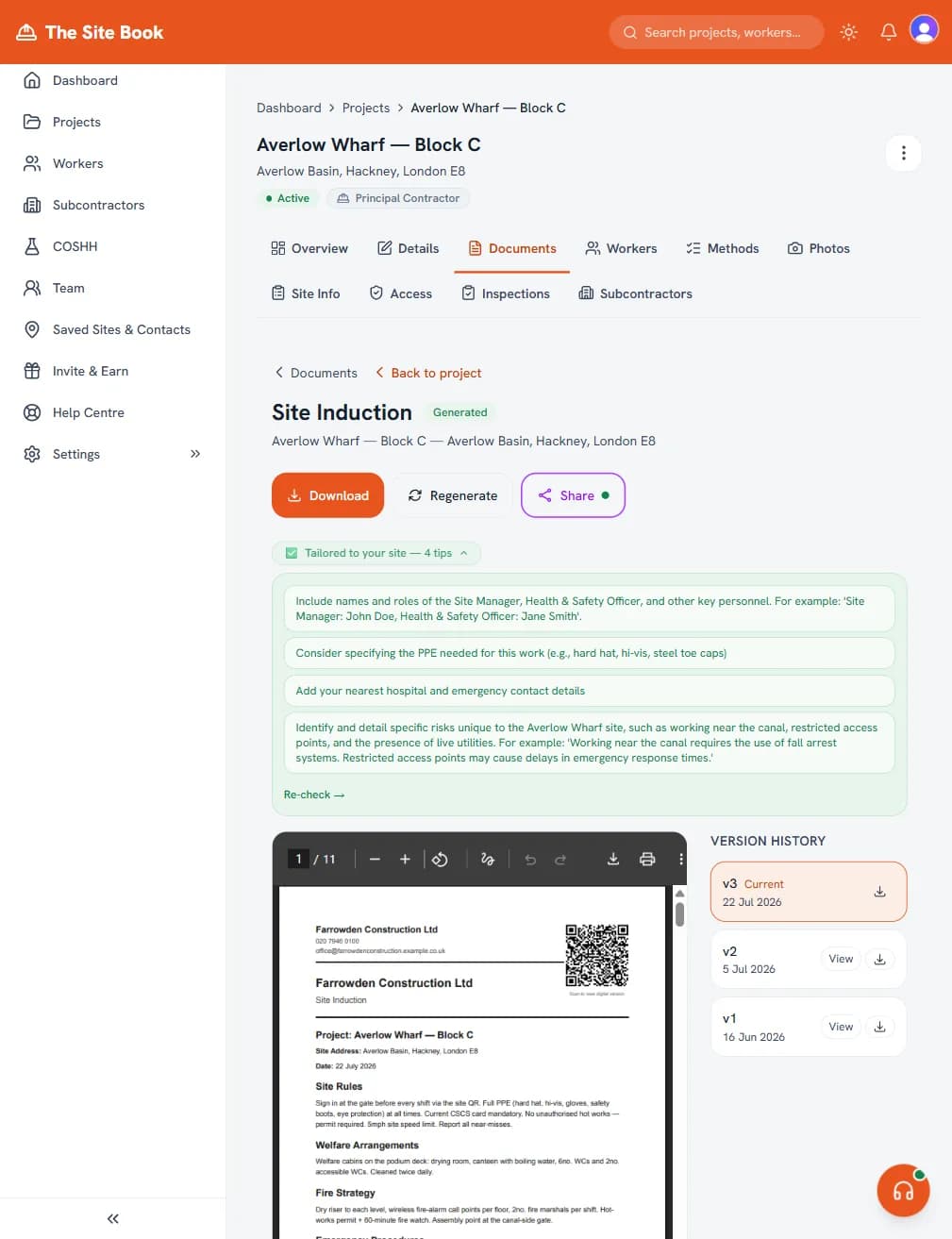
Before you download, we check your document for vague wording. 'Appropriate PPE' gets flagged — because an inspector wants to know which PPE. 'Follow relevant legislation' gets flagged — because that's not a control measure. We suggest the specific wording so your documents actually say something.
SDS Upload
Got a data sheet from a manufacturer? Upload the PDF. We extract the hazard statements, PPE requirements, first aid info, exposure limits, and storage instructions. Review it, approve it, and you've got a COSHH record you can reuse across every project. No more reading 16-page data sheets.
AI Chat
Got a compliance question at 10pm on a Sunday? Ask us. Our chat knows CDM 2015, RAMS, COSHH, permits to work, and how to use every feature in The Site Book. Plain English answers — no trawling through HSE PDFs or waiting until Monday to ring someone.
Quality checking in action
What's included
- PCPP import — upload a pre-construction plan and auto-fill your project
- Document quality checking — vague wording flagged before you download (Pro and above)
- Specificity score out of 100 on every document
- One-click fix suggestions for flagged issues (Pro and above)
- SDS upload — extract safety data from manufacturer PDFs (Pro and above)
- AI chat — compliance answers in plain English, any time
- Hazard extraction from uploaded documents
- No AI add-ons to buy — each AI feature is included with its plan
Checks, not just templates
The Site Book reads the documents you upload, checks what you write for vague wording and, on Pro, suggests specific fixes before you download. You still review every document — these tools help you spend that review on the parts that matter for your site.
Upload, check, fix, download. That's how compliance software should work.
What's included at each tier
Starter
£0- Risk Assessments (RAMS)
- Construction Phase Plans (CPP)
- Site inductions
- Worker document signing (no per-signature charge)
Pro
£39/mo or £360/yr- Risk Assessments (RAMS)
- Construction Phase Plans (CPP)
- Site inductions
- COSHH assessments (standalone doc, SDS upload, site-specific register)
- Worker cert tracking and expiry alerts
- Right-to-work evidence records
- Subcontractor tracking
- Toolbox talks
- Worker document signing (no per-signature charge)
- Integrations (Drive, Xero, Zapier)
Business
£199/mo- Risk Assessments (RAMS)
- Construction Phase Plans (CPP)
- Site inductions
- COSHH assessments (standalone doc, SDS upload, site-specific register)
- Worker cert tracking and expiry alerts
- Right-to-work evidence records
- Subcontractor tracking
- Toolbox talks
- Worker document signing (no per-signature charge)
- Integrations (Drive, Xero, Zapier)
- Up to 10 internal team logins
- Site Supervisor: a field-only login for whoever runs the site
- Up to 50 active site portal users
- Site attendance check-in/check-out
- Multilingual worker inductions (9 languages)
- Optional 4-digit PIN for shared-link document sign-off
- Plant & equipment register with project assignment, certificates, inspections and defects
- Slack Site Ready readiness checks
Site Control
£675/site/mo- Risk Assessments (RAMS)
- Construction Phase Plans (CPP)
- Site inductions
- COSHH assessments (standalone doc, SDS upload, site-specific register)
- Worker cert tracking and expiry alerts
- Right-to-work evidence records
- Subcontractor tracking
- Toolbox talks
- Worker document signing (no per-signature charge)
- Integrations (Drive, Xero, Zapier)
- Up to 10 internal team logins
- Site Supervisor: a field-only login for whoever runs the site
- Up to 50 active site portal users
- Site attendance check-in/check-out
- Multilingual worker inductions (9 languages)
- Optional 4-digit PIN for shared-link document sign-off
- Plant & equipment register with project assignment, certificates, inspections and defects
- Slack Site Ready readiness checks
- Permanent entrance QR: guest sign-in and contractor self-join
- CSCS credential capture, review and expiry alerts
- Digital induction gating before check-in
- Live people-on-site, attendance and audit-grade exports
- Single sign-on (SSO) with Okta or Microsoft Entra
- Public REST API with scoped account keys
- Signed real-time webhooks into your own systems
Running live sites with subcontractors? Site Control is the per-site enterprise tier above Business — entrance QR sign-in, CSCS checks, induction gating, live attendance and audit-grade exports. From £675/site per month, plus £5,000 setup.
Common questions about AI tools
Does the AI replace a health and safety consultant?
No — and we're not trying to. We help you create solid documents without the blank-page start, but we don't replace professional judgement. If your project involves unusual risks, complex demolition, or work that's outside your experience, you should still get expert advice. What we do is handle the compliance work that's routine — so you can focus your consultant time on the things that actually need it.
How accurate is the PCPP import?
It depends on the quality of the PDF. For well-structured pre-construction plans, we extract site details, client info, hazards, and team members with high accuracy. You always review and approve everything before it's used — nothing goes into your project blind. If the PDF is a scanned image or handwritten, the extraction may be less complete, but you can fill in the gaps manually.
What if the AI gets something wrong?
You review everything before it's used. We create a draft — you approve it. If a hazard is missing, add it. If a control measure needs changing, change it. The quality checking works both ways: we flag problems in the output just as we flag problems in documents you write yourself. The goal is better documents, not autopilot.
Where it helps and where it doesn't
Pros
- Trained on CDM 2015, HSE guidance, and UK construction hazards
- Drafts RAMS, CPP, COSHH from a plain-English job brief
- Vague wording flagged before you publish the doc
- Rewrites and edits use the same AI — consistent voice
Cons
- UK-focused training data — international frameworks not supported
- AI still requires a human sign-off step before PDF export
- Generated content is reviewed, not auto-published, by design
Why The Site Book
- UK construction compliance tool that ships RAMS + CPP + COSHH + inductions (readable and acknowledgeable in 9 worker languages on Business, with the language audit-recorded) + worker sign-off, including optional 4-digit shared-link PIN evidence on Business, plus site attendance, portal users, site files, document reviews, subcontractor evidence and inspections/actions.
- Generate a site-specific RAMS first draft from a natural-language brief, ready for competent-person review - not a template library you hand-fill.
- Controlled document workflow without an enterprise contract: version history and a recorded issue confirmation before a document is shared with a client or downloaded in the app on every plan, re-sign on revision with superseded signatures preserved plus PCPP import, cert tracking and document checking from the £39/month Pro plan - and on Business, optional named-approver routing (a designated approver accepts or rejects each version, with recorded reasons, before it can be issued) plus client approve/reject/request-changes via share links.
- Transparent pricing: Starter £0, Pro £39/month or £360/year, Business £199/month with 10 management logins and 50 active site portal users. Worker document signing has no per-signature charge; project workers count as active portal users while assigned.
- Build RAMS for any trade - add your own work types and method statements alongside the built-in library, reusable across projects, including a ready-made Commercial Solar PV group. Save a finished job as a reusable project template, or clone it, so the next job of the same shape starts from your own setup.
- COSHH goes deep: a standalone COSHH assessment document, upload-a-Safety-Data-Sheet extraction, a site-specific substance register and an expert-reviewed library - plus per-worker RAMS sign-off and a one-click Audit Pack covering documents, sign-offs, worker evidence, attendance, incidents, COSHH, permits and up to the latest 500 live Site Diary entries.
“Great Platform at a really reasonable price. I asked for some help with customising work types and the next day they introduced a new feature to the site letting me do just that. Couldn't ask for better service!”
Oli
Trustpilot review
See the AI in action
No card needed. Upload a PCPP and create a RAMS on your free first project. The quality checker that flags the waffle, and SDS upload, are included on Pro.